Device Access Authorization
Device authorization is the platform's core permission model. Understanding it avoids confusion like "why can't org members see this device?".
Core Rules
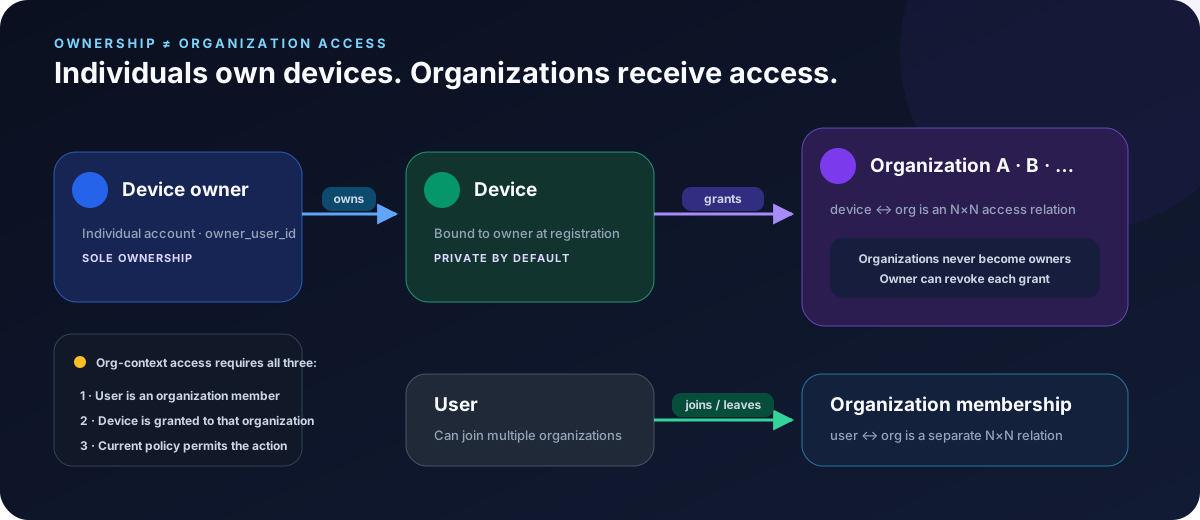
- Devices always belong to an individual — bound to the device owner with a personal token at registration.
- Organizations do not own devices — an org can only be granted access by the device owner.
- Device ↔ org is N×N authorization — a device can be authorized to multiple orgs, and an org can be authorized to multiple devices.
- Private by default — without authorization a device is visible only to its owner.
Authorize a Device to an Org
- As the device owner, select the target device on My Devices.
- Authorize it to one or more organizations.
- Organization members can then see the device in org view; actual access and each operation still require membership plus the applicable policy decision.
My Devices lists the organizations currently granted access and provides per-organization grant and revoke actions. A grant target must be an organization you have joined; granting access never changes the device owner.
Revoke
The owner can revoke an org's authorization at any time; members immediately lose visibility and access.
Regenerate a Dial Code
The device owner can also regenerate a device's dial code from My Devices. The strong confirmation explains that the old dial code becomes invalid immediately, old-generation grants stop working, established grant sessions may be torn down, and the action cannot be undone from the console. After success, the page refreshes the device list and does not retain or log a new sensitive connection credential.
Membership vs Authorization
Device authorization (device ↔ org) and membership (user ↔ org) are two independent N×N relations:
- Joining an org ≠ automatic access to its devices — the device must also be authorized to that org.
- Authorizing a device to an org ≠ changing ownership — the owner is still that individual.
Related
- Membership: Organizations & Members.
- Onboarding & orchestration: Fleet Management.