Temporary Support
Temporary support lets you remotely help a stranger's machine without the other end registering an account — much like TeamViewer QuickSupport: the local user generates a short-lived support code, reads it to you, and you redeem it in the console to connect. The whole session is held capability-scoped by their host and is discarded once done.
A support code is essentially a device code with a bounded lifetime (TTL): it reuses that device's per-code capability ceiling (configured by the device owner under My Devices), and it goes through the same unified redemption as a device code — you type either a device code or a support code into the same connect box on the console home, and the server detects which.
Redemption does not consume the code. To support reconnects it can be redeemed again while its TTL remains; every redemption is audited separately. A grant minted from it never outlives the code itself.
Two roles
- Person being helped (the host) — on the host machine's Remote Support page (in the sidebar), they click "Get a support code". The host has Manager issue a short-lived support code bound to that device, shown with the remaining time. Clicking "End support" revokes the code and every linked grant, then actively closes reachable live sessions. When the code naturally expires, its grants cannot remain valid beyond it.
- Supporter (you, the controller) — signed in with your own account, type the code they read out into the connect box on the console home and connect to reach their desktop. You do not need to own or be granted access to that device; because you are not the device owner, this session is minted as a capability-scoped session.
Flow
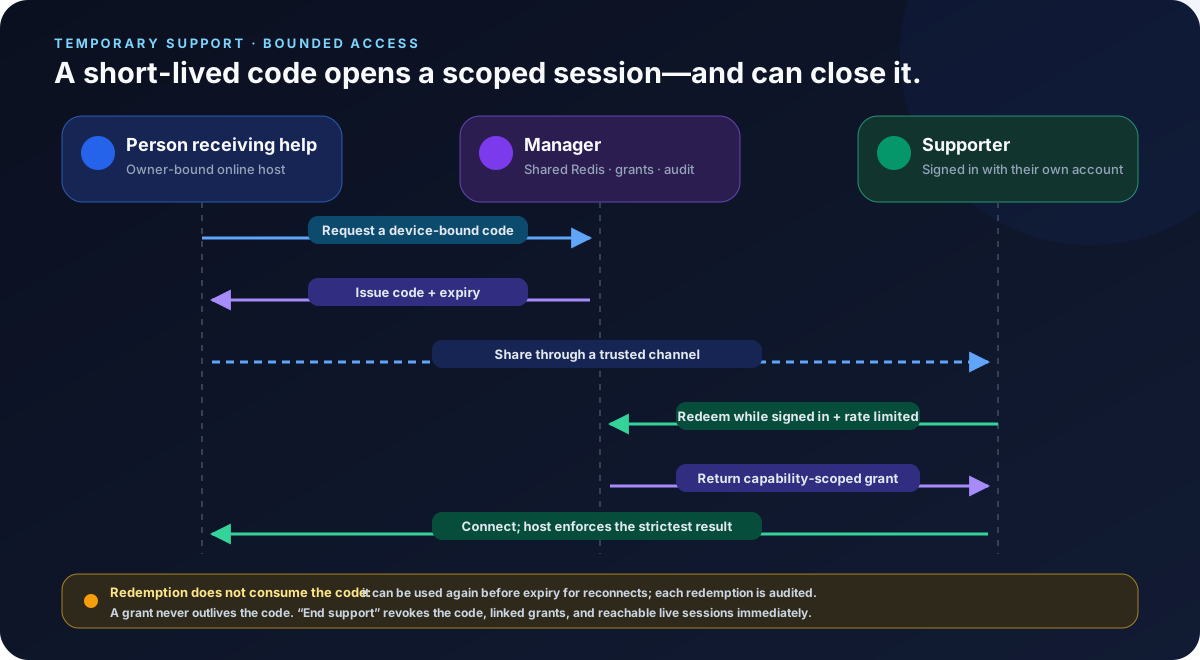
Security model
A supporter is only semi-trusted, so the session is locked down and enforced by the host, not the signaling server:
- Short-lived and explicitly revocable — the code can be redeemed repeatedly within its TTL for reconnects and is protected by a per-user redemption rate limit. It cannot be redeemed after expiry, and minted grants cannot outlive it. End support revokes the code, linked grants, and live sessions early.
- Capability-scoped (three-way meet) — for each action in a support session, the capability actually in force is the meet of the code's ceiling, the host's global access settings, and live approval. The device owner configures the per-code ceiling under My Devices (three-state: allow / ask / deny, or the View only / Assist / Full presets); when unconfigured it defaults to all-ask (every capability prompts the host user), never to full control. File browsing only permits directory listings and metadata; deletion is a separate destructive capability and requires both File browse and File delete. File transfer remains an independent upload/download capability. This replaces the older fixed rule that denied clipboard, file transfer and whiteboard outright.
- Signaling allow-list — only session-establishment and control-plane frames pass on a scoped session; any frame that could leak host credentials (such as the
manager_api_token) is hard-denied on the host. - No change to device ownership — a support code never grants the device to the supporter, and it is not recorded in your Recently connected list or device grid.
A support code cannot carry its own ceiling — it reuses the device's per-code ceiling. To tighten or open what a support session may do, adjust that ceiling under My Devices → edit the device.
Auditing: the supporter's act of redeeming a support code under their own account is recorded in the action log (with the supporter's account and source IP) for traceability.
Next
- Regular connections and how views are organized: Console Overview.
- How the ceiling shapes each action and the full three-way meet semantics: see the open-source docs' Access Codes and Signaling Authentication → Access-grant sessions (device & support codes) sections.